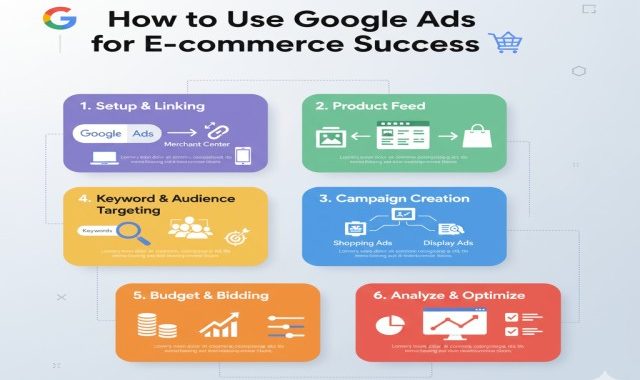
Starting an online store in itself is exciting, but reaching the right customers might be tough. That is where Google Ads come into place. While billions of searches go on every day, Google Ads help an e-commerce business reach people who mean business. This article will explain exactly how to use Google Ads to boost your e-commerce sales and achieve some real success.
1. How to Harness the Power of Google Ads for E-commerce
Paid advertising with Google Ads is a sure way for your products to appear at the very top of Google’s search results. In fact, when people search for any product like yours, your ad could pop up in an instant, giving you direct access to potential customers.
Why Google Ads is great for e-commerce:
You reach customers who are actively looking to buy.
You pay only when someone clicks on your ad: the PPC model.
You can select target audiences, locations, and devices.
It gives instant visibility, unlike organic SEO, which takes time.
Utilizing smart strategies, Google Ads are able to drive highly targeted traffic that converts into real sales.
2. Select the Right Type of Google Ads Campaign
Google has many ad types, not all of which are the best fit for e-commerce. This means the first step to success is choosing the right campaign type.
Best campaign types for e-commerce:
Shopping Ads: Showcase your product image, price, and brand directly in search results. Perfect for online stores.
Search Ads: These are text-based ads shown when people search for precise keywords. This is fantastic for high-demand products.
Display Ads: These are ads that appear visually on websites, blogs, or YouTube. This is best utilized for brand awareness and retargeting.
Performance Max Campaigns: This is a smart campaign type on Google, which automatically displays your ads across all Google platforms using AI.
YouTube Ads: These are small videos to visually show off your products and drive more engagement.
Each kind of campaign has a different purpose, so it’s all about the choice depending on your aim: awareness, traffic, or sales.
3. Conduct Proper Keyword Research
Keywords are the backbone of a Google Ads campaign. You need to reach your audience without wasting any budget; therefore, choosing the right keywords is paramount.
How to find the best keywords:
Use tools like Google Keyword Planner or Ubersuggest.
Focus on the long-tail key terms, such as “buy black leather shoes online”, and not general keywords like “shoes”.
Focus on the commercial intent keywords, which are the ones that denote buying interest.
Irrelevant or very broad keywords may waste your clicks.
Pro Tip:
Create a list of negative keywords, meaning those words for which you would not want your ad to appear. This will save money by avoiding unqualified clicks.
4. Optimize Your Product Feed (for Shopping Ads)
If you’re running Google Shopping Ads, the product feed is everything. It’s made up of the data that tells Google about your products.
Key points to optimize your feed:
Use clear and descriptive titles for your products.
Write keyword-rich, full product descriptions.
Add high-quality product images.
Keep prices, stock status, and categories up-to-date.
Include unique product identifiers, like GTINs or SKUs.
The better your product feed, the more precisely Google will be able to match your products with relevant searches.
5. Creating Engaging Ad Copy
Even if your ad shows up in search results, it still has to get noticed and clicked by users, and that’s where your ad copy comes in.
Tips for Writing Effective Ad Copy:
Use strong action words such as Shop Now, Buy Today, Limited Offer.
Highlight benefits such as Free Shipping, Discounts, Easy Returns.
Add numbers or offers, for example, “Up to 40% Off on Winter Collection”.
Do include target keywords in both headline and description.
Use emotional triggers to connect with your customers.
Always test multiple versions of your ads-you know, A/B testing-to figure out which one performs the best.
6. Ad Extensions for Better Results
Google Ads provides ad extensions that might allow you to show extra information in your ad and give you an edge over the competition.
Useful ad extensions for e-commerce:
Sitelink Extensions: Add links to specific product categories.
Callout Extensions: Highlight features such as “Free Delivery” or “24/7 Support.”
Price Extensions: Showcase prices right within the ad itself.
Promotion Extensions: Display special offers or limited-time discounts.
Review Extensions: Add customer ratings or testimonials.
Using extensions will increase the visibility and CTR of your ad.
7. Optimize Your Landing Pages
Getting clicks is only half the battle; it’s the conversion of visitors into customers that matters. A poor landing page can completely ruin a great ad campaign.
Make sure your landing page:
It matches the product in the ad.
It loads fast on mobile and desktop.
Has a clear headline and call-to-action.
Includes trust signals like reviews, secure checkout icons.
Easy to navigate, smooth checkout.
A well-optimized landing page means the user will complete a purchase without distractions.
8. Set a Realistic Budget and Bidding Strategy
Google Ads can get very costly if you do not track your budget effectively. So, set a daily budget that aligns with your goals and test before scaling up.
Tips for smart budgeting
Start small, and analyze what works.
Utilize automated bid strategies like “Maximize Conversions” or “Target ROAS (Return on Ad Spend)”.
Track the cost per click and conversion rates regularly.
Increase spending on the top-performing campaigns.
Keep in mind, it’s not about the traffic; it’s about profitable sales.
9. Performance tracking and measuring of ROI
You can’t improve what you don’t measure. Monitoring the performance of your campaign provides insight into what drives the results.
Performance Indicators to watch:
Click Through Rate (CTR): The rate at which people click on your ad.
CPC stands for Cost Per Click, meaning the amount you pay for a click.
Conversion Rate: The percentage of visitors making a purchase.
ROAS stands for Return on Ad Spend: the revenue you generate per dollar spent.
Impression Share: How frequently your ad shows up as opposed to those of your competitors.
Monitor performance with Google Analytics and Conversion Tracking. Build improvements based on data.
10. Remarketing to bring back lost shoppers
Not everyone buys on the first visit, hence the fact that remarketing is an extremely powerful strategy for e-commerce stores. The process of remarketing allows targeting users who visited your site but never converted into customers. Remind them of the product viewed, or give special discounts to bring them back.
Key tips for effective remarketing:
Show dynamic product ads related to what users viewed.
Offer limited-time deals to encourage action.
Avoid overexposing users by setting frequency capping.
Remarketing can boost conversions and recover lost sales greatly.
Conclusion
Google Ads is one of the most powerful tools to enjoy e-commerce success, provided it is utilized judiciously. From keyword research to smart bidding and remarketing, each step plays its role to maximize your online sales. Remember, success does not happen overnight. Always test, analyze, and optimize your campaigns regularly. If utilized properly, Google Ads will turn your online store into a money-making machine and help you reach new customers to grow your e-commerce business faster than ever.