Skip to content
Best Google Ads Extensions to Use in 2025-Complete Guide
Google Ads, in the modern age, has grown to be one of the most influential advertising mediums a business can use. But do you know what really separates your ad from others? This is not all about keywords or a bidding strategy-it’s Google Ads extensions.
An extension is the added detail that tells a user more about your ad, such as a phone number, link, rating, or special offer. These extensions make your ad more interesting, informative, and clickable. In 2025, using the right ad extensions will give your campaigns a serious performance boost.
This article will cover the best Google Ads extensions you should be utilizing in 2025 and their benefits towards ensuring better results.
1. What are Google Ads Extensions?
Extensions are a way to add extra features to your text ads in Google Ads. This provides users with supplementary information and gives them further reasons to click your ad.
Now, consider these add-ons that can make your ad stronger and more appealing.
For instance,
By default, if you have a restaurant, for example, you can show an address, phone number, and customer ratings in addition to your main ad. That way, people can make quick decisions without necessarily having to visit your website.

2. Why Google Ads Extensions Matter in 2025
With AI and user intent, Google gets smarter. It is more likely that ads with more detail and relevance will have better click-through rates and quality scores.
The following are major reasons you should use ad extensions:
The Increased Visibility: Extensions make your ad take up more space in the search results.
Higher CTR-when users find relevant details they are most likely to click.
Better user experience: They provide direct access to the most important information.
Improved Ad Rank: Through the improved rank, Google incentivizes the ads which are more engaging.
More Conversions: Extensions take the user directly to what they are looking for, be it your phone number or a product page.
3. Types of Google Ads Extensions You Should Use in 2025
Let’s look at the most effective Google Ads extensions you should be using in 2025.
All of them serve different purposes, so you should choose based on what you are after: sales, leads, awareness, or local visits.
Continue reading→
The Power of Negative Keywords in Google Ads Campaigns
When running Google Ads, most marketers tend to focus on selecting the right keywords, but it’s actually knowing what words not to target that’s the secret to saving money and increasing ad performance. These are called negative keywords.
In this blog, we will explain what negative keywords are, why they are so important, and how you can use them to get better results from your Google Ads campaigns.
What Are Negative Keywords?
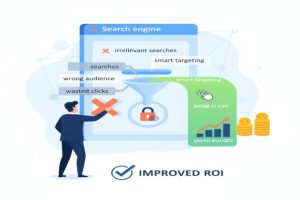
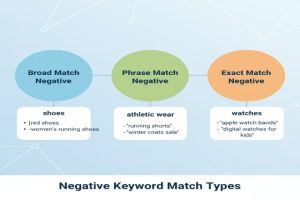
Negative keywords are the words or phrases that you tell Google not to show your ads for.
For example, if you’re selling high-end “leather shoes,” you wouldn’t want your ad to appear when a person searches for “cheap leather shoes.”
By adding the word “cheap” as a negative keyword, it will prevent your ad from appearing for people who are unlikely to buy your product, which saves your budget for real customers.
Speaking simply, negative keywords filter out irrelevant traffic, ensuring that your ads reach only those who actually need what you offer.
Why Negative Keywords Matter
Negative keywords are among the most powerful tools within Google AdWords because they help you:
Save Money:
With CPC marketing, you never pay for clicks that don’t convert.
Increase Relevance:
Your ads are shown only to the right audience, improving quality score and ad performance.
Improve Click-Through Rate (CTR):
By removing irrelevant searches, more of your impressions are from people that are actually interested in your offer.
Improve Conversion Rate:
This may be because more qualified leads are seeing your ad, increasing chances of sales or sign-ups.
Improve ROI
Every click you pay for is more valuable when it comes from the right audience.
In other words, negative keywords keep your campaigns clean and focused.
Continue reading→
How to Use Google Ads for E-commerce Success
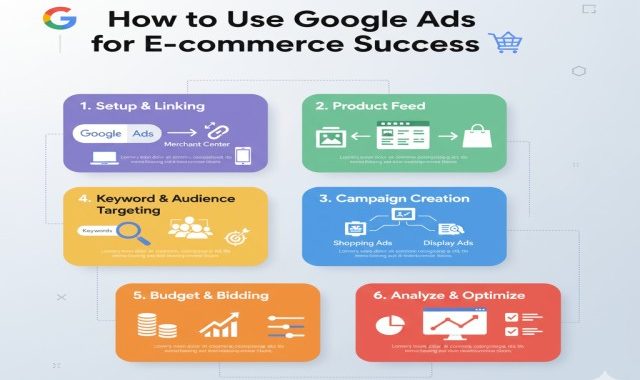
Starting an online store in itself is exciting, but reaching the right customers might be tough. That is where Google Ads come into place. While billions of searches go on every day, Google Ads help an e-commerce business reach people who mean business. This article will explain exactly how to use Google Ads to boost your e-commerce sales and achieve some real success.
1. How to Harness the Power of Google Ads for E-commerce
Paid advertising with Google Ads is a sure way for your products to appear at the very top of Google’s search results. In fact, when people search for any product like yours, your ad could pop up in an instant, giving you direct access to potential customers.
Why Google Ads is great for e-commerce:
You reach customers who are actively looking to buy.
You pay only when someone clicks on your ad: the PPC model.
You can select target audiences, locations, and devices.
It gives instant visibility, unlike organic SEO, which takes time.
Utilizing smart strategies, Google Ads are able to drive highly targeted traffic that converts into real sales.

2. Select the Right Type of Google Ads Campaign
Google has many ad types, not all of which are the best fit for e-commerce. This means the first step to success is choosing the right campaign type.
Best campaign types for e-commerce:
Shopping Ads: Showcase your product image, price, and brand directly in search results. Perfect for online stores.
Search Ads: These are text-based ads shown when people search for precise keywords. This is fantastic for high-demand products.
Display Ads: These are ads that appear visually on websites, blogs, or YouTube. This is best utilized for brand awareness and retargeting.
Performance Max Campaigns: This is a smart campaign type on Google, which automatically displays your ads across all Google platforms using AI.
YouTube Ads: These are small videos to visually show off your products and drive more engagement.
Each kind of campaign has a different purpose, so it’s all about the choice depending on your aim: awareness, traffic, or sales.

Continue reading→
What’s New in Google Ads 2025: Latest Features & Updates
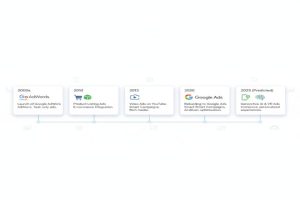
The year 2025 has seen Google Ads move faster than ever. A marketer, business owner, or freelancer who can stay updated with changes and new features in Google Ads will get the most out of their campaigns. This year, too, Google has introduced a number of important updates, mainly on AI automation, audience targeting, ad customization, and performance tracking.
Let’s dive into the new features and updates in Google Ads for 2025 that you should be aware of to have an edge over your competitors.
1. AI-Powered Campaign Optimization
The biggest change in Google Ads 2025 has to do with the greater role given to Artificial Intelligence. While it already did much, now Google’s AI is playing a bigger role: analyzing user intent, predicting conversions, and automatically adjusting bids in real time.
Key Highlights:
With Google’s AI, it can predict the best words and audience segments driving better performance.
Smart Bidding strategies-like Target ROAS and Maximize Conversions-are now smarter and can adapt to market changes much faster.
AI-powered suggestions save time for the advertiser by freeing them from doing manual optimizations.
This feature is very useful for small businesses since they may not have the expertise or time to monitor a campaign day in and day out.
2. Better Performance Max Campaigns
Performance Max campaigns are getting their biggest update yet at Google in 2025. Already, campaigns let advertisers run ads across all Google platforms-including Search, Display, YouTube, Gmail, and Discover-all in one campaign.
What’s New:
More control over targeting: Besides full automation, you’ll be able to choose audiences, devices, and locations.
Creative asset insights: Now, Google provides detailed reports on the best-performing images, headlines, and videos.
AI-generated creatives: There’s the ability to automatically generate ad headlines and images tailored for your audience using Google’s AI.
This makes Performance Max even more powerful and transparent, finally giving the marketer both automation and control.
3. New ad formats on YouTube and Shorts
With the explosive growth of YouTube Shorts, Google has now introduced new ad formats designed to capture attention in short-form content.
Updates Include:
Shorts overlay ads: Ads now come as short, skippable overlays between videos.
Interactive Product Tags: With tagged products in videos, viewers can directly click on them to facilitate more sales for a business.
AI-Generated Video Ads: Now, Google can transform your text or image asset into short video ads automatically through its artificial intelligence algorithms.
These updates make it easier for brands to reach younger audiences and capitalize on the video-based marketing trends.
Continue reading→
The Beginner’s Guide to Google Ads: How to Run Your First Campaign
If you have ever used Google to search for something, then you must have seen the set of ads atop the results. It is one of the most powerful online advertising platforms, which helps businesses reach potential customers at the exact moment they are searching for products or services.
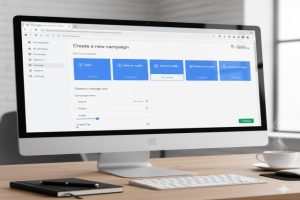
In this how-to guide, we will take you through a step-by-step approach in setting up and running your first Google Ads campaign, even if you are a complete beginner.
What is Google Ads?
Google Ad Words is a web advertising method composed of small advertisements that can be put on Google search results and YouTube, among other partnered websites. You pay only if people click your ad; hence, it is called Pay-Per-Click advertising.
It’s a simple concept:
You’re designing an ad.
Target keywords that people actually search for.
Your ad appears when users search those keywords.
If they click, then you pay Google some small fee.
Why use Google Ads?
Following are some of the major reasons why Google Ads are an indispensable tool for any business:
Huge Reach: Google conducts over 8.5 billion searches daily. Your ad can reach thousands instantly with such a huge reach.
Targeting: You can target by keyword, location, age, and even device.
Budget control: you can decide how much to spend, and there is no minimum.
Measurable results include the fact that, with Google Ads, analytics are in real time, tracking every click and every conversion.
Fast Results: Unlike SEO, Google Ads can display traffic just hours from the beginning of a campaign.
Step 1: Create Your Google Ads Account
First things first:
Go to ads.google.com
Happy World Intellectual Property Day.
Click “Start Now.”
Log in by using your Gmail account.
Choose from a variety of desired ad objectives, such as website traffic, leads, or sales.
Once you’re done, it will take you to your dashboard from where you can create and manage all your campaigns.
Pro Tip: Choose “Expert Mode” if you want full control over your campaigns-not Google’s simplified setup.
Continue reading→